

Skip to content
smappen logo black
  • Product
    • Features
      Desktop icon

      Features

      Draw areas, access to demographics & businesses data, and many more.
      📊 Data Catalog

    • Made for

      Made for...

      • > Franchisors
      • > Retailers
      • > Delivery & Supply Chain
      • > Sales
      • > Marketing
    • Book demo

      Contact sales

      Meet your friendly support heroes with a personalized demo

      👉 Book your call now

      Smappen icon Product
  • Pricing
  • Resources
    • Blog
      Blog icon

      Blog

      Navigate through all our advice and geomarketing guides on our blog!

      Help center icon

      Help center

      Need help using Smappen? Find our complete documentation here.

    • Customer stories
      academy icon

      Customer stories

      Read our resources and get inspired by our customer stories to know what you can achieve easily with Smappen. 📚

      toolbox

      Franchisor Toolbox

      A premium collection of exclusive resources, insights, and tools designed to drive franchisor success and growth.

    • Documentation

      INTERACTIVE DEMO

      Smappen walkthrough

      smappen_walkthrough

      Discover how to master Smappen with our easy-to-follow walkthrough!

      👉 Try our interactive demo

  • Wall of Love 💜
  • Contact
Try for free
Try for free
Go to the map
Go to the map
smappen logo black

Help center

Get Started
  • Creating a catchment area or territory
  • Analyzing your area’s population data
  • Exporting zip codes (Excel report)
  • Searching for Points of interest
  • Generate your Analysis Report
  • Importing and analyzing your own data
Overview
  • Introduction
  • The map
  • The area-creation panel
  • The area-management panel
  • The analytics & data panel
  • Heatmap Data Overview
Managing areas
  • Add an area
    • Drawing an isodistance
    • Drawing an isochrone (drive-time area)
    • Drawing an as-the-crow-flies area
    • Creating a manual area
    • Importing areas into the map
    • Importing administrative boundaries
    • Creating administrative areas
    • Creating areas in bulk or from an Excel sheet
  • Managing areas
    • Renaming an area
    • Hiding or showing an area
    • Changing an area’s color
    • Merging areas
    • Cutting out part of an area
    • Extending an area
    • Shrinking an area
    • Exporting an area
    • Moving an area to another folder
    • Deleting an area
    • Modifying areas
    • Copying an area to a map
    • Undo an Action
    • Analyze the Intersection of Multiple Areas
  • Managing folders
    • Introduction to folders
    • Creating a folder
    • Renaming a folder
    • Hiding or showing a folder
    • Moving a folder
    • Deleting a folder
  • Managing maps
    • Creating a new map
    • Switching maps
    • Renaming a map
    • Deleting a map
    • Sharing a map
    • Managing a map’s users
    • Taking a screenshot
    • Hiding or showing area pins / labels
    • Exporting a map
    • Duplicating a map
    • Merging maps
Data analysis
  • Analyze population data
    • Population data by country
    • Conducting population analysis
    • Exporting an Excel report on population
    • Heatmap Data Overview
    • Advanced population analysis by country
  • Searching for Points of interest
    • Searching for Points of interest
    • Points of Interest (businesses and services) data available by country
    • Editing a Points of Interest search
    • Deleting Points of Interest search
    • Modifying the name of a Points of Interest search
    • Showing or hiding businesses and services on the map
    • Changing the aspect of a Points of Interest search
    • Exporting Points of Interest (Excel report)
    • Downloading a Business Search with 10,000 Results or More
    • Heatmap Data Overview
  • Custom Area Analysis
    • Generate your Analysis Report
    • Customize a report (Custom Area Analysis)
  • Extract cities & zip codes
    • Exporting cities (Excel report)
    • Exporting zip codes (Excel report)
    • Administrative boundaries available by countries
    • Exporting the administrative coverage of all your areas into a single Excel file
  • Import and analyze my data
    • Hiding or showing your data on the map
    • Exporting your data from an area
    • Deleting your data from the map
    • Changing the color of markers for your imported data
    • Share a map with your imported data
    • Heatmap Data Overview
    • Importing and analyzing your own data
    • Preparing your file to be imported
    • Automatically import your contact or company lists from HubSpot
  • My Metrics
    • Create and Manage your Custom Metrics
    • Advanced calculations and analyzes on My Metrics
    • Exporting My Metrics for your areas into a single Excel file
    • Heatmap Data Overview
Account management
  • Managing your subscription
  • Managing your billing details
  • Managing your payment methods
  • Downloading your invoices
  • Change your login credentials
  • Managing my users and my data storage
  • My Downloads
  • Subscribe to smappen
  • Create a secure password
  • Home
  • Documentation
  • Account management
  • Managing your subscription

Managing your subscription

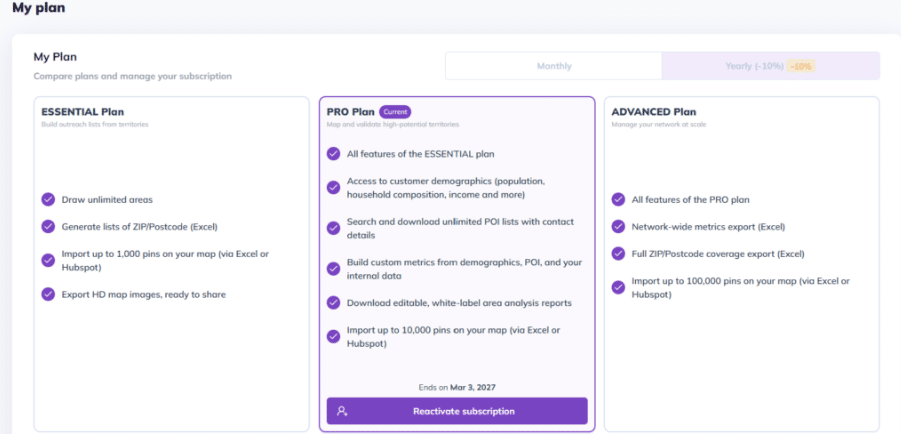
You can manage your subscription directly in Smappen to:
  • Switch to a different plan:
  • Switch to annual billing:
  • Cancel my subscription:
  • Reactivate my subscription:

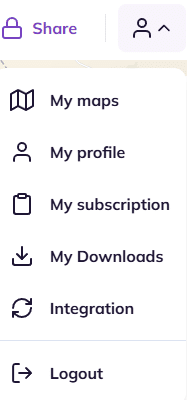
To do so, access the account-management menu by clicking on the account icon. Then, click on “My subscription“:
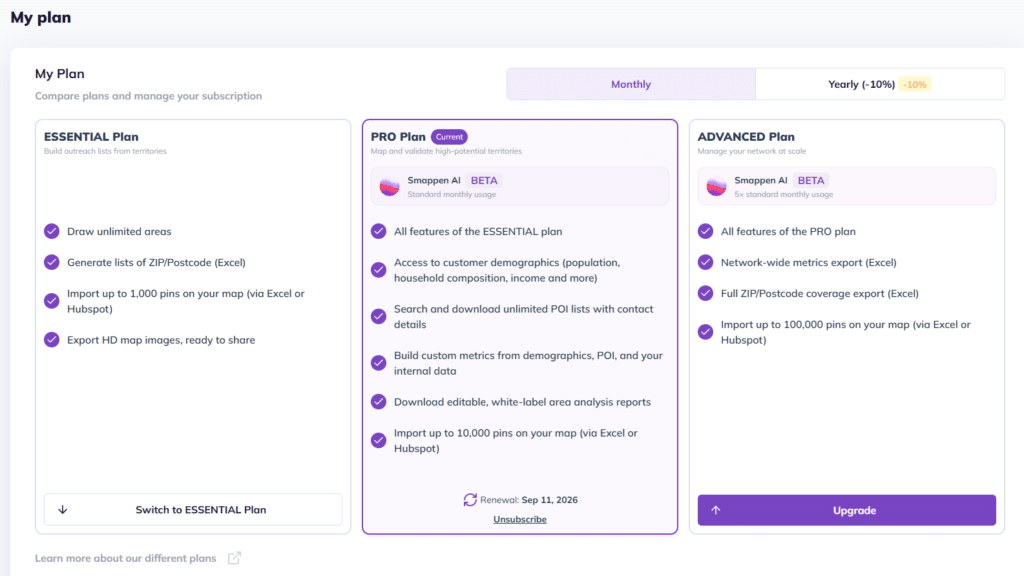
Switch to a different plan: #

To switch plans, select your preferred option and click “Upgrade” or “Switch to ESSENTIAL Plan.”
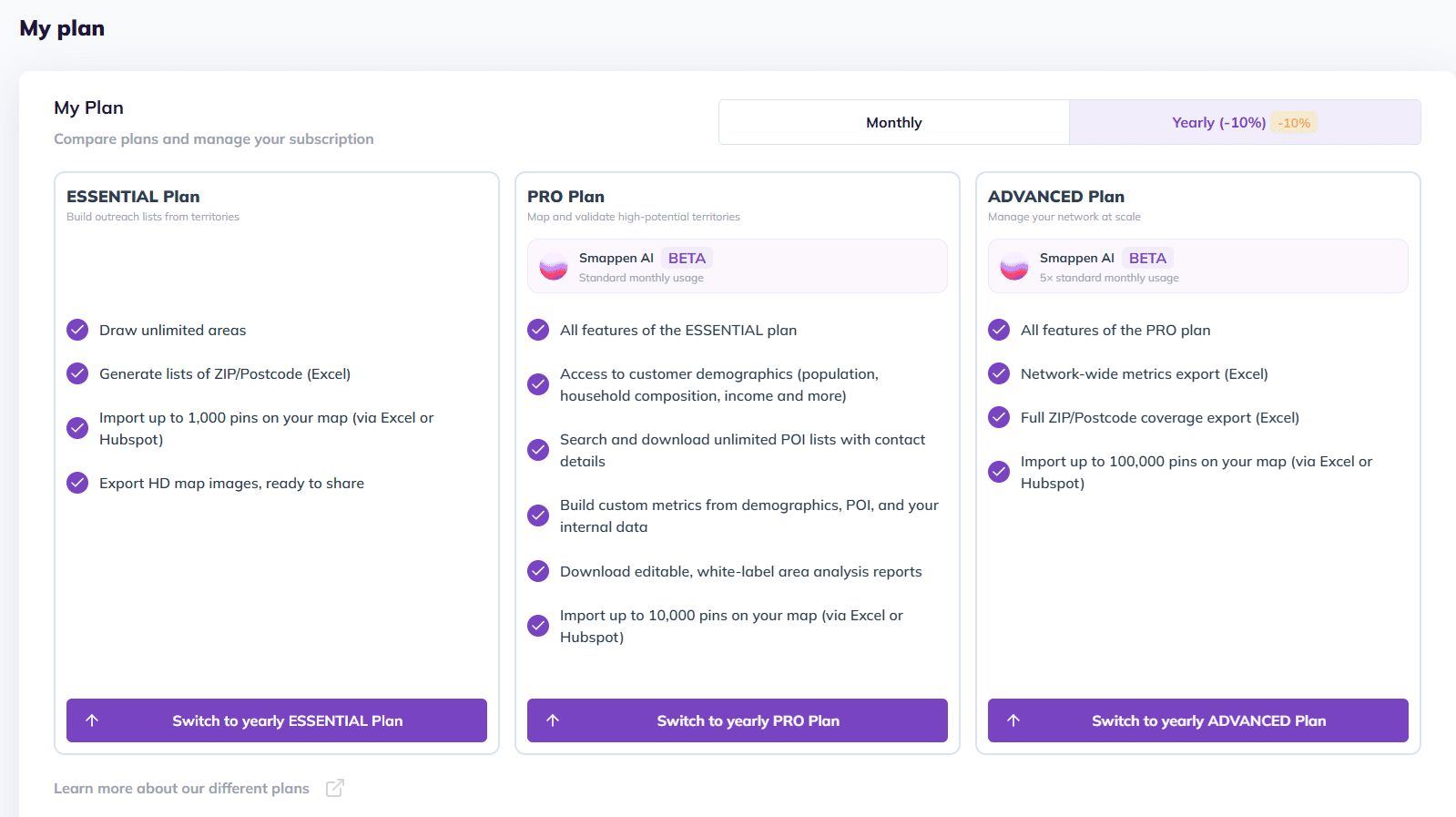
Switch to annual billing: #

To switch from monthly to annual billing and save 10% on your subscription, select “Annual,” then click “Switch to PRO Annual.”
Cancel my subscription: #

To cancel your current subscription, click “Unsubscribe” Your access will automatically end at the conclusion of your current billing period.
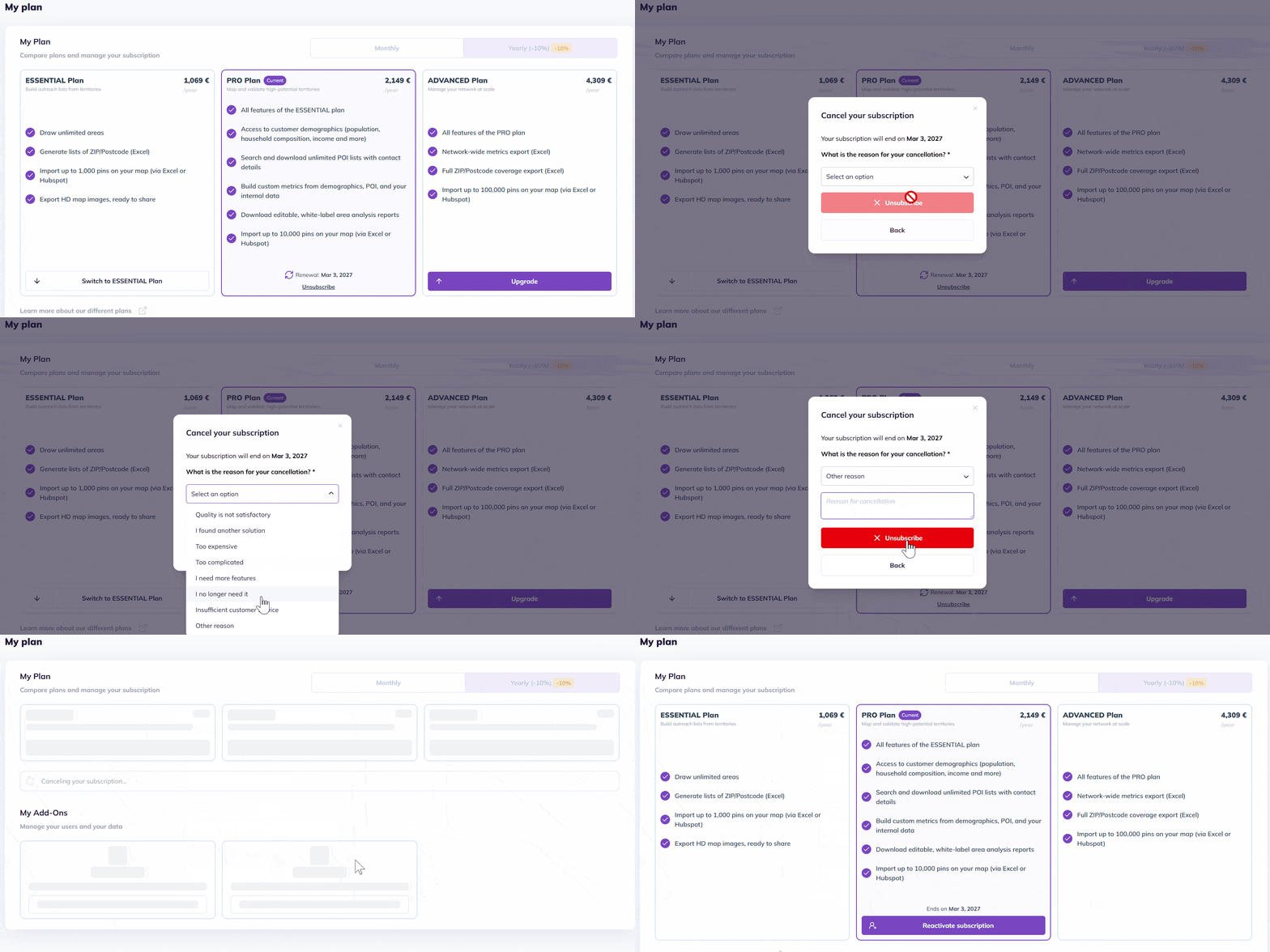
Reactivate my subscription: #

You can resubscribe anytime by clicking Subscribe, all your previous work has been saved and will be ready for you when you return.
FAQ #

🟢Do I still have access to my maps when my subscription is canceled?

Yes, even if you cancel your paid subscription, you’ll still have access to your account and all the maps you’ve created.
You’ll simply continue using Smappen with the features available on the Free plan.
You can find more details about our plans here.

🟢 Does canceling my subscription automatically delete my account?

No. Canceling your subscription ends your billing cycle, but your account remains active on the free version and is not automatically deleted.

🟢 How do I switch from annual to monthly billing?

To change your billing cycle and switch back to a monthly plan, please follow these steps:

  1. Cancel your current subscription: Go to “My plan” and cancel your annual plan.
  2. Transition period: Your access will remain active until the end of your prepaid annual term. There will be no interruption in service.
  3. Resubscribe: Once your annual period ends, you can resubscribe by selecting the “Monthly” option when reactivating.
Go to your subscription

To go further:

  • Managing your billing details
  • Managing your payment methods

Updated on March 3, 2026
Table of contents
  • Switch to a different plan:
  • Switch to annual billing:
  • Cancel my subscription:
  • Reactivate my subscription:
    • FAQ
Go to the map
Go to the map
  • Features
  • Blog
  • Customer stories
  • Pricing
  • Documentation
  • Contact
Try for free
Try for free
  • Features
  • Blog
  • Customer stories
  • Pricing
  • Documentation
  • Contact

Campus AT HOME
3 rue Alaric II, 31000 Toulouse
FRANCE

[email protected]
+33 (0)9 72 40 54 09

About Us
Product Releases

Guides

  • Location intelligence
  • Franchisors
  • Trade Area
  • Points of interest
  • Territory Mapping
  • Mapping software
  • Cannibalization
  • Radius Map
  • Isochrone

Interactive maps
Glossary

Articles

  • Travel time map
  • Drive Time Analysis
  • Geomarketing
  • GIS software
  • Cartography
  • Market Penetration

Terms and conditions

  • Privacy policy
  • Standard license agreement and terms of use

Smappen VS Atlas Mapping
Smappen VS GbBis
Smappen VS Maptitude

Our Partners
Our Customers

Copyright © 2026 Smappen