
Radius Map
Create Free Radius on a Map
Your radius looks good. But is it a good territory?
A radius alone doesn’t tell you if an area can support your business.
In Smappen, you can instantly analyze population, competitors, points of interest and real market potential — then export a professional territory report in seconds.
Draw radius map for free with Smappen’s interactive map. Create as-the-crow-flies or isodistance areas for any distance or transportation method.
Radius Map: Visualize any area around a location. Instantly.
A radius map lets you draw a distance-based area around a specific location — and instantly understand what’s inside it.
With Smappen, radius maps are used every day by franchisors, sales teams and retail networks to analyze markets, define territories, and make better expansion decisions — without complex GIS tools.
What is a Radius Map?
A radius map is a circular area drawn around a point (address, city, store, prospect…), based on a defined distance — for example 5, 10 or 30 miles.
Businesses use radius maps to:
understand how far customers or prospects are located
visualize coverage areas
analyze markets and opportunities around a location
It’s often the first step in any geographic analysis: simple, fast, and easy to interpret.
They are a fundamental radius map tool for businesses aiming to thrive in their local markets.
Why businesses use radius maps
Radius maps aren’t just about drawing circles on a map. They’re about making smarter local decisions.
Franchise development
Franchisors use radius maps to:
define exclusive territories
avoid overlap between franchisees
validate expansion zones before selling a territory
A simple radius map often helps answer the key question:
“Is there enough room for another location here?”
Sales territories
Sales teams rely on radius maps to:
assign leads within a defined distance
balance territories between reps
reduce travel time and improve coverage
Instead of guessing, teams can clearly see who covers what — and why.
Retail & site selection
Retailers use radius maps to:
visualize catchment areas around stores
compare potential locations
analyze competitors and customer distribution
It’s a fast way to understand real local reach.
Local marketing
Marketing teams use radius maps to:
focus campaigns where their ideal customers live
prioritize high-potential areas
align local marketing with sales or franchise territories
Real-world examples
Franchise expansion
A fitness franchisor uses a 15-mile radius map to evaluate whether a new territory could impact nearby franchisees.
The map helps validate exclusivity zones before launching sales discussions.
Sales coverage
A B2B sales team maps a 30-mile radius around each sales rep.
The result: clearer territories, fairer workload distribution, and less time wasted on the road.
These are everyday use cases — not theoretical ones.
Radius map vs drive-time map: what’s the difference?
Radius maps and drive-time maps are often confused — but they serve different purposes.
| Radius map | Drive-time map |
|---|---|
| Based on distance | Based on real travel time |
| Very fast to create | More precise in urban areas |
| Great for initial analysis | Ideal for operational planning |
| Simple and easy to read | Accounts for traffic & roads |
👉 In practice, many teams start with a radius map, then refine their analysis with drive-time maps.
With Smappen, you can use both — depending on your use case.
Smappen's Innovative Approach to Radius Mapping
At Smappen, we’ve taken radius mapping to the next level. Our geomarketing solution empowers you to create maps, manage, and visualize catchment areas with unmatched precision and ease. Our mapping tool multiple modes of defining it, including isochrones, isodistance, manual drawing, and administrative boundaries. This flexibility ensures that you have the perfect software to analyze your business’s local appeal and reach.
How to Create Radius Map Easily and Effectively
With Smappen, creating a radius map has never been so easy!
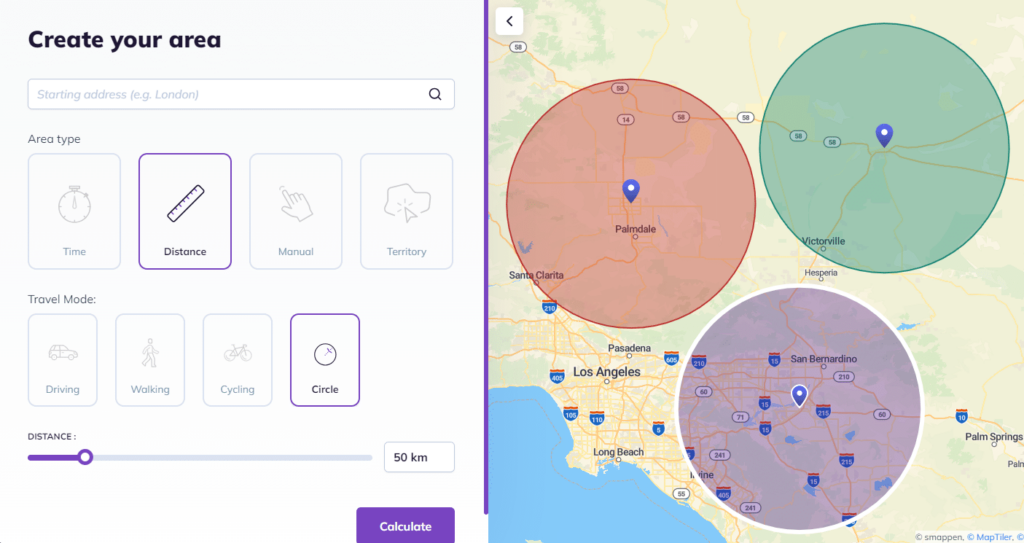
- Go to smappen.com/app/ (it’s free)
- Click on “Add an area”
- Define your starting point address
- Select the “Distance” travel mode
- Then, click on “Circle” mode
- And select the distance you need (in miles or kilometers)
- Click on Calculate
And there you go! You have your radius on a map, in less than 1 minute 🙂
With Smappen, you have a bunch of choice to draw your areas: by distance, by time, and also by states, counties or zip codes.
What is the Best Map Radius Tool?
Here are some of the best radius map tools:
- Smappen is highly regarded as an overall tool.
- Maptive, more difficult to use.
- CalcMaps is a good basic, but limited when it comes to business data, territories or real-world use cases.
- Free Map Tools is also useful for quick, one-off visualizations. But not built for teams.
- TravelTime is excellent for advanced use cases, but more technical, less intuitive.
Here’s a comparison of different tools for creating and analyzing radius maps.
Each of these offers different functionalities, catering to various needs from basic mapping to advanced data integration and analysis. Your choice will depend on the specific requirements of the task at hand and radius calculator needs to be free or can be a paid service.
Smarter Site Selection with Radius Maps
One of the most effective ways to choose the perfect location for your business is by using radius maps. Instead of blindly picking a spot, radius mapping helps visualize customer reach, competition, and accessibility within a set distance.
For example, with Smappen, businesses can draw a 1-mile, 5-mile, or even 10-mile radius around a potential site to analyze population density, demographic trends, and competitor presence.
By combining radius maps with real-world data, businesses can make smarter, data-driven site selection decisions, ensuring they open in a location with strong demand and high growth potential.
- Unlocking demographic insights within catchment areas
- Competitive analysis and local economic ingights
- Harnessing customer data for growth
Unlocking Demographic Insights within Catchment Areas
One of Smappen’s standout features is the ability to access demographic data within your catchment areas. With our data, you can gain insights into the population’s gender, age, socioeconomic status, housing, and more. This information is invaluable for tailoring your marketing strategies and understanding the local consumer landscape.
Competitive Analysis and Local Economic Insights
Our platform enables you to perform competitive analysis and gain insights into the local economic landscape. With a simple keyword search, you can identify businesses or services around, fostering collaboration opportunities and a deeper understanding of the local market dynamics.
Harnessing Customer Data for Growth
Smappen allows you to import your own data. This feature answers critical questions like, “Where do my customers come from?” and “In which zone do I generate the most revenue?” It’s a game-changer for improving market penetration and strategic decision-making. Optimize resource allocation, tailor your marketing efforts more effectively, and drive substantial business growth.
Why Choose Smappen for Your Radius Mapping Needs
What sets Smappen apart from its competitors? Our user-friendly approach, coupled with a highly responsive support team, ensures you get the most out of our geomarketing solution. Unlike others, we offer flexible pricing with a monthly subscription model and no long-term commitment, making Smappen accessible to businesses of all sizes. With minimal training requirements, you’ll be up and running in no time.
Radius Map and Data Visualization: Tips and Tricks
When working with radius tools and data visualization, there are several tips and tricks that can greatly enhance the effectiveness and impact of your visual representations. Here are some key points to consider:
Choose the Right Radius Tool by selecting one that best fits your needs. ArcGIS, Maptive, and others offer various features for creating radius maps.
Before you start mapping, have a clear understanding of the data you are working with.
Avoid cluttering your map with too much information. Focus on the most important data points to make your map readable and effective.
Use contrasting colors for different zones to make comparisons easier.
If you have multiple data sets, consider layering them on your map. However, ensure that the layers are distinct and easy to toggle on and off for clarity.
Position your business at the forefront of local market research with Smappen – your trusted partner in geomarketing!
Read our best articles on radius map
Isochrone VS Radius map – Usage and Interest for Your Business
Leverage isochrone maps and radius to drive strategic decisions, improve market analysis, and optimize customer accessibility.
The 5 Best Tools for Drawing Radius Maps
Discover what radius maps are, how they’re used, and why tools like Smappen offer the most dynamic way to harness their potential.
How to use radius maps for delivery
Create dynamic radius maps easily with tools like Smappen, enhancing delivery strategies and business planning.
Zip Code Radius: A Comprehensive Guide for Businesses
Find all ZIP codes within a specific radius using a Zip Code Radius Tool like Smappen, ideal for targeting better business locations in the US.
How a Map Radius Calculator can Transform your Business
Discover what radius maps are, how they’re used, and why tools like Smappen offer the most dynamic way to harness their potential.
All you need to know about radius maps
Discover what radius maps are, how they’re used, and why tools like Smappen offer the most dynamic way to harness their potential.
FAQ - Radius Map
What is a radius map?
A radius map is a map showing a circular (or other shaped) area around a central point—defined either by a fixed distance (kilometres/miles) or a travel-time (e.g., 10 minutes drive/time). It helps visualise reach, accessibility and catchment areas for businesses, logistics, deliveries, retail sites, etc.
How to create a radius map?
Typically you choose a central location (address or coordinate), select a radius (distance) or travel-time (isochrones), then draw the area on a map tool. With your site you could emphasise:
Select “Add an area” → 2. Enter the starting point address → 3. Choose distance or travel time → 4. Choose circle mode (or isodistance/isochrone) → 5. Click calculate. (As your page already states.)
Which tools are good for creating radius maps?
Many tools exist. The page already names a few: your own tool (“Smappen”), Maptive, FreeMapTools, TravelTime etc. Each has different levels of ease, data overlays (demographics, POIs), price, and customization.
Why should a business use a radius map?
Using a radius map helps a business understand the geographic catchment: Who lives/works within that zone? Where are competitors? How far will customers travel? It aids site-selection, delivery planning, market analysis, marketing budget allocation and more.
Is a radius map free to use?
It depends on the tool. Some basic tools allow simple circle maps for free; more advanced features (isochrones, demographic overlays, competitor analysis) often require a paid subscription. You can emphasise that your tool offers a “free radius map in minutes” for the basic use-case, and scales up for deeper functionality.
With Smappen, you can draw radius map and another types of maps for free.
Create Your Radius Map with Smappen