Finding the right prospects is hard enough. Targeting them efficiently? Even harder.
Most B2B sales and development teams don’t really know where to focus their efforts and that costs time, money, and missed opportunities.
Geomarketing changes that equation. By combining geographic data with business data, you can quickly spot where your best prospects are located, understand their environment, and build a targeted outreach plan. All without needing a GIS degree.
Let’s explore how to prepare your B2B prospecting using Smappen !
Step 1 - Define Your Ideal Customer profile
Before you open any map, you need a clear picture of who you’re going after. Start examining your existing customers: which ones are the most profitable, the easiest to convert, or the best fit for your model?
Ask yourself:
- What industry or sector are they in?
- What’s their typical company size (headcount, revenue)?
- What geographic area do they operate in?
- Are there specific neighborhoods, district, or catchment areas where they tend to cluster?
The sharper your ICP, the more useful your map becomes. Geomarketing is only as good as the criteria you feed into it.
Once you’ve identified your ideal customer, it’s time to start gathering data on potential customers that match that profile. This can include information on their location, company size, industry, and other relevant factors. Using geodata to collect this information will be of great help and the best way to carry out actions in your catchment area.
Step 2 - Build Your catchment Area and Analyze the Market
Once you know who you’re targeting, it’s time to define your catchment area — the geographic zone you’ll prioritize for prospecting. This is where geomarketing tools like Smappen make the biggest difference.
You can define a catchment area based on:
- A drive time or travel time radius (e.g., 15 minutes from your office or a key location)
- A circle radius from a central point
- Postal codes, zip codes, or custom boundaries
Example: A B2B software company in Sacramento wants to focus on tech companies within a 10-minute drive from downtown. In Smappen, they draw the isochrone, and instantly see demographic breakdowns.

First, I know that my area contains 457,257 people. I can also know the average salary level and the gender distribution. I can therefore link this information with my ideal customer and potential customers sought in my catchment area.

Then, I can see at a glance how many businesses are in my area: here 13,917 establishments.
From there, you can layer in the data that matters to your business: company type, points of interest, population density, or income levels — whatever variables define a qualified prospect for you.
Step 3 - Identify and Map your Target Companies
Search by business type
Smappen lets you search for businesses by category directly within your catchment area. Spot clusters of potential customers, identify gaps in coverage, and get a clear visual of the competitive and commercial landscape.
Back to our Sacramento example: searching for tech companies within the 10-minute drive zone returns 72 results — most of them clustered very close to headquarters. That’s actionable. The sales team now knows exactly where to focus their outreach.

This kind of visual makes it easy to optimize your sales territory and route planning. Instead of covering ground randomly, your team moves efficiently — reducing travel time and increasing the number of meaningful conversations per week.
Export your prospect list
Once you’ve identified your target companies on the map, you can export the data as an Excel file. Each export includes:
- Company name
- Phone number
- Website URL
- Address
Use this list as the foundation for your cold outreach, whether by phone, email, or field sales visits. Filter and sort the data to prioritize high-value accounts or plan efficient routes.
Import your own lead data
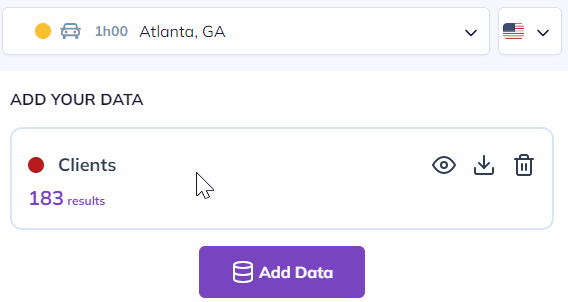
Already have a lead list? Import it directly into Smappen.
Note: Your data is stored locally on your machine — Smappen never stores it on its servers, keeping your prospect data fully confidential.
Read our documentation to see how to import lead data 😊
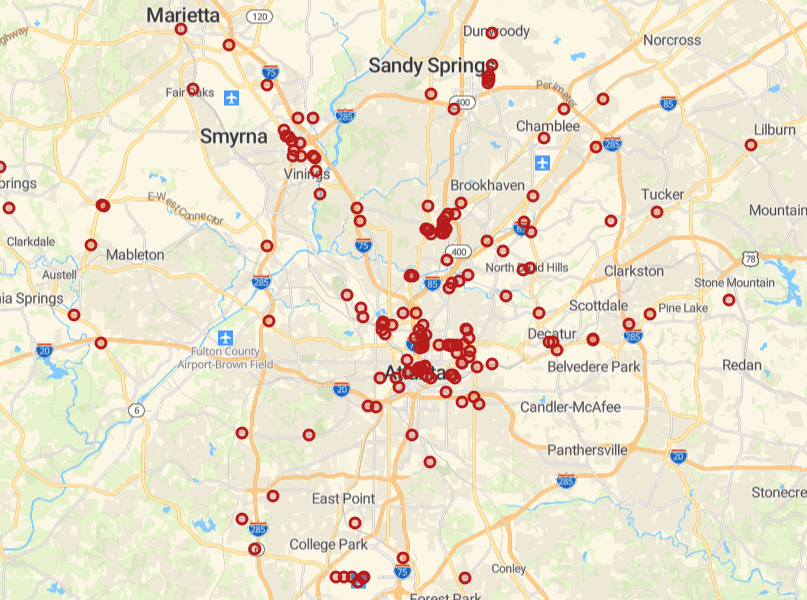
Once imported, your leads appear as pins on the map. You can then build prospecting zones around lead clusters, prioritize visit schedules, and identify white space where you have few or no contacts yet.
💡 Smappen’s import feature is also useful for franchise development teams preparing franchisee recruitment campaigns: visualize where candidates are, where white space exists, and build territory outlines around high-potential zones in minutes.
Step 4 — Build Targeted Outreach Campaigns
With your prospect map in hand, you’re ready to design campaigns that match the reality on the ground — not just a generic target list.
Use demographics to refine your messaging
Smappen’s demographic layers give you context on each zone: population density, age distribution, income levels, and more. Use this data to:
- Segment your prospect list by zone characteristics
- Tailor your messaging to reflect the local market context
- Prioritize zones with the highest concentration of qualified prospects
Example: A B2B staffing agency expanding into a new region uses Smappen to identify zones with a high concentration of mid-size manufacturing companies, cross-referenced with workforce demographics. They build hyper-targeted campaigns for each zone rather than a single national outreach — and conversion rates improve as a result.
Set up digital campaigns using zip codes or postcodes
Smappen makes it easy to extract zip codes (or postcodes) from your catchment area. Use these to run geo-targeted digital ad campaigns on LinkedIn, Google, or Meta — reaching exactly the right businesses in the right locations without wasting budget on out-of-scope audiences.

Bonus tip: Use the heatmap in the bottom-left corner to identify the ZIP codes or priority areas to target for a more effective campaign. You can leverage demographic segmentation, business counts, and other custom filters.
Monitor and iterate
Prospecting is never a one-shot effort. As your campaigns run, update your maps and re-evaluate:
- Which zones are converting best?
- Where are there untapped clusters of prospects?
- Which territories are getting crowded by competitors?
Continuous map-based analysis helps you improve ROI over time — shifting budget and effort toward the areas that generate the most pipeline.
Ready to Make Your Prospecting Smarter?
A great B2B prospecting campaign starts with clarity: who you’re targeting, where they are, and how to reach them efficiently. Geomarketing gives you that clarity — in minutes, not days, and without needing a data analyst or a GIS consultant.
With Smappen, you can:
- Draw your prospecting catchment area in seconds
- Identify target companies by type and location
- Export your prospect list with contact data
- Enrich your outreach with demographic insights
- Import and visualize your own lead data
The result: a targeted, data-informed sales motion that helps your team spend less time guessing and more time selling.
You can improve your chances of success and stand out from the competition !
See you on the app 👋
FAQ - B2B Prospecting Campaign
B2B prospecting is the process of identifying and reaching out to businesses that could become customers. It’s the first stage of the sales cycle: before a pitch, before a demo, before a deal — you need a list of qualified targets. Effective B2B prospecting combines a clear ideal customer profile (ICP), reliable data on potential accounts, and a structured outreach strategy. The goal is to fill your pipeline with contacts who are genuinely likely to convert, rather than blasting generic messages to a cold, unqualified list.
Building a quality B2B prospect list starts with defining your ICP: the industry, company size, location, and other firmographic criteria that characterize your best-fit customer. From there, you can use a geomarketing tool like Smappen to identify companies matching those criteria within a defined geographic area, then export their contact data (name, address, phone, website) directly into a spreadsheet. The result is a targeted, location-qualified list — ready for cold outreach, field visits, or digital ad targeting — rather than a broad database of unverified contacts.
The most efficient way is to use a geomarketing tool. In Smappen, you start by drawing a catchment area around the zone you want to cover — using a drive-time isochrone, a straight-line radius, or a set of postal/zip codes. Then you search for businesses by category within that zone (e.g. “tech companies”, “manufacturing plants”, “healthcare practices”). The tool displays them as pins on the map and lets you export the results as a prospect list. This approach is far more targeted than buying a generic national database, because every contact is pre-qualified by location and business type.
Most B2B prospecting workflows combine several tool types: a CRM (to manage contacts and track outreach), a data enrichment platform (to find verified contact details), an outreach tool (for email sequences or LinkedIn automation), and a geomarketing solution (to identify prospects by location and build targeted territories). Smappen fits into that last category: helping sales and development teams who need to visualize their market geographically, identify prospect clusters, and plan their territory coverage — without needing GIS expertise or a consulting budget. You can go from sign-up to your first prospect export in a single session.
With Smappen, the setup is straightforward:
- 1 — Define your ICP
- 2 — Draw your catchment area (drive time, radius, or zip codes)
- 3 — Search for target businesses by type within that zone
- 4 — Export the prospect list as an Excel file (name, address, phone, website)
- 5 — Use zip codes from your zone to run geo-targeted digital ads (LinkedIn, Google)
- 6 — Import your results back into Smappen to track coverage and spot white space
The whole setup — from drawing the first area to having a usable prospect list — takes under an hour.