GeoMapper has long been a favourite among HubSpot teams needing a simple way to map contacts, companies, and deals.
But since HubSpot acquired GeoMapper, the tool is no longer accepting new sign-ups — leaving many RevOps, Sales, and CRM teams searching for a reliable alternative.
If you previously relied on GeoMapper, or are looking for a modern HubSpot-compatible mapping and territory tool, this guide will walk you through:
- What happened to GeoMapper
- The jobs GeoMapper used to solve
- Why Smappen is the most complete GeoMapper alternative
- How to migrate from GeoMapper to Smappen
- Frequently asked questions
What Happened to GeoMapper?
GeoMapper (by the team behind OrgChartHub) was one of the most installed HubSpot mapping apps, used to:
- Visualise CRM contacts, companies, and deals on a map
- Filter data based on HubSpot properties
- Create simple custom areas
- Export or sync lists back into HubSpot
In 2025, HubSpot acquired OrgChartHub and GeoMapper with the intent of building these capabilities directly into the CRM.
As a result:
- GeoMapper was removed from the HubSpot App Marketplace
- The product is no longer accepting new accounts
- Existing users can continue using it, but no public roadmap or support timeline is available
- Many teams are now searching for a replacement that seamlessly integrates with HubSpot
What GeoMapper Allowed You to Do
1. Analyze the geographic distribution of clients and prospects
GeoMapper made it possible to visualize where your customers and leads were located.
Teams used this to:
- Understand their market footprint
- Identify clusters of high-value accounts
- Compare regional performance
- Make territory decisions based on real CRM data — not just intuition
This was one of the core reasons HubSpot users adopted GeoMapper in the first place.
2. Launch more effective local marketing campaigns
With your CRM data displayed on a map, you could quickly identify:
- Priority regions for promotions
- Areas with high prospect density
- Zones where campaigns underperformed
It allowed marketing teams to create zip-code level targeting, smarter local segmentation, and more relevant outreach.
3. Organize your sales team’s visits more efficiently
By seeing prospects grouped on a map, GeoMapper allowed sales managers to:
- Plan visits in the most efficient order
- Reduce unnecessary travel
- Assign reps to geographic zones
- Improve overall field productivity
While it didn’t include advanced routing, the map itself was helpful for day-to-day planning.
4. Support operations teams with zonal pricing
Some businesses used GeoMapper to outline geographic zones that supported:
- Price segmentation
- Delivery/distance-based fees
- Regional service policies
These “operational territories” were simple to draw — though limited in accuracy and flexibility.
Meet Smappen: A Modern GeoMapper Alternative for HubSpot Users
Smappen is a territory mapping platform used by 80,000+ monthly users worldwide — including franchise brands, retail networks, and B2B field sales teams.
And critically: Smappen integrates natively with HubSpot, allowing you to sync contacts, companies, and deals directly into your maps and territories.
Here’s what makes Smappen a strong alternative.
Feature-by-Feature Comparison: GeoMapper vs Smappen
| Feature | GeoMapper | Smappen |
|---|---|---|
| HubSpot integration | ✔️ Yes | ✔️ Yes (native, flexible sync) |
| Map HubSpot contacts/companies/deals | ✔️ | ✔️ |
| Filter CRM data | ✔️ | ✔️ Advanced filters + metrics |
| Draw custom areas | ✔️ Basic polygons | ✔️ Polygons + drive-time + walking-time + biking-time + radius + admin boundaries |
| Territory design | ❌ Limited | ✔️ Full territory builder, templates, hierarchy |
| POI search (businesses, services, places) | ❌ | ✔️ 20M+ POIs |
| Demographic data | ❌ | ✔️ Available for multiple countries |
| Market potential reports | ❌ | ✔️ Automatic |
| Multi-country mapping | ❌ | ✔️ Yes |
| Multi-data + multi-source mapping | ❌ | ✔️ Combine CRM + external data (spreadsheets, imported lists…) |
| Reporting & performance tracking by territory | ❌ | ✔️ Yes — analyze by zone, performance, saturation, market potential |
| Availability | ❌ No longer available | ✔️ Fully available |
Pricing: What Happens Now That GeoMapper Lives Inside HubSpot?
When HubSpot acquired OrgChartHub, the entire feature set eventually moved to the HubSpot Enterprise plan — which starts at ≈ $3,600/month (for Marketing Hub).
Because GeoMapper was acquired at the same time, many users expect the same outcome:
GeoMapper-style features may only be available inside HubSpot’s Enterprise tier in the future.
If that happens, teams that previously paid around $65/month for GeoMapper could suddenly be subject to Enterprise-level pricing just to keep access to basic mapping capabilities.
What this means in practice
- If HubSpot integrates mapping into the Enterprise plan (like it did with OrgChartHub), the cost jump will be significant.
- Teams that only need mapping, territories, or geographic analysis would end up paying for a full enterprise CRM bundle.
- Pricing becomes tied to HubSpot’s roadmap and not your actual needs.
Smappen avoids that problem
Smappen keeps your costs simple, transparent, and independent from HubSpot’s pricing cycles.
- Paid plans from ~$99–$199/month without commitment You can synchronize your HubSpot data based on the number of points available in your plan: 1,000 on the Essential plan, 10,000 on the Pro plan, and 100,000 on the Advanced plan. If you wish to synchronize more points, additional packs are available.
- You pay only for the mapping and territory features you actually use
- HubSpot integration remains fully accessible, regardless of your HubSpot tier
- No forced upgrade, no enterprise lock-in
👉 This gives you far more control over your budget and roadmap than relying on future HubSpot Enterprise packaging.
How Smappen Replaces (and Expands) Your Former GeoMapper Use Cases
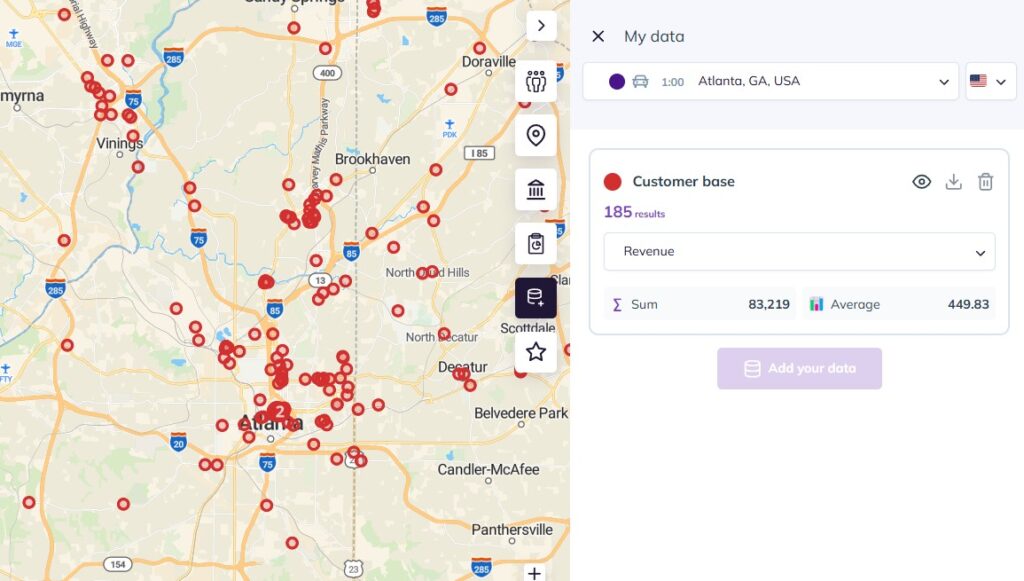
1. Map your HubSpot CRM data instantly
With the Smappen × HubSpot integration, you can:
- Import contacts, companies, deals, or custom lists
- Apply filters (status, owner, lifecycle, deal stage…) at will
- Visualise where your accounts, prospects or clients are located
- Understand company / prospect distribution, cluster density, territory coverage
This replicates the core value of GeoMapper — but with more flexibility, better performance, and scalability.
2. Build advanced territories (not just simple shapes)
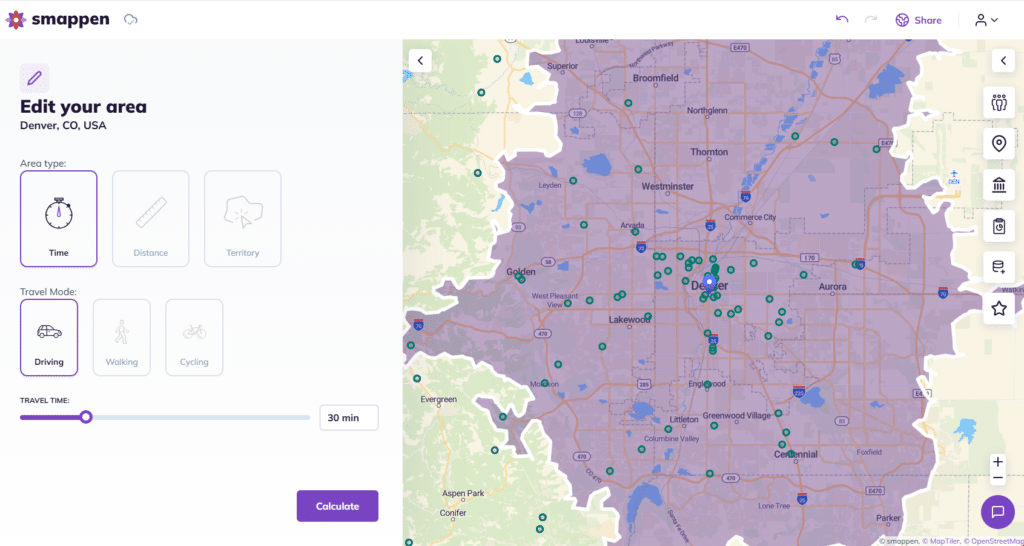
Smappen lets you create territories using:
- Drive-time areas (5, 10, 15, 20 minutes…)
- Walking/biking-time areas
- Distance radiuses
- ZIP/postal codes
- Counties, states, provinces
- Custom polygons
You can even combine multiple layers and build complex, scalable territory structures.
Perfect if you’re in:
- Franchise development
- Retail expansion
- Field sales
- Distribution zones
- Delivery areas
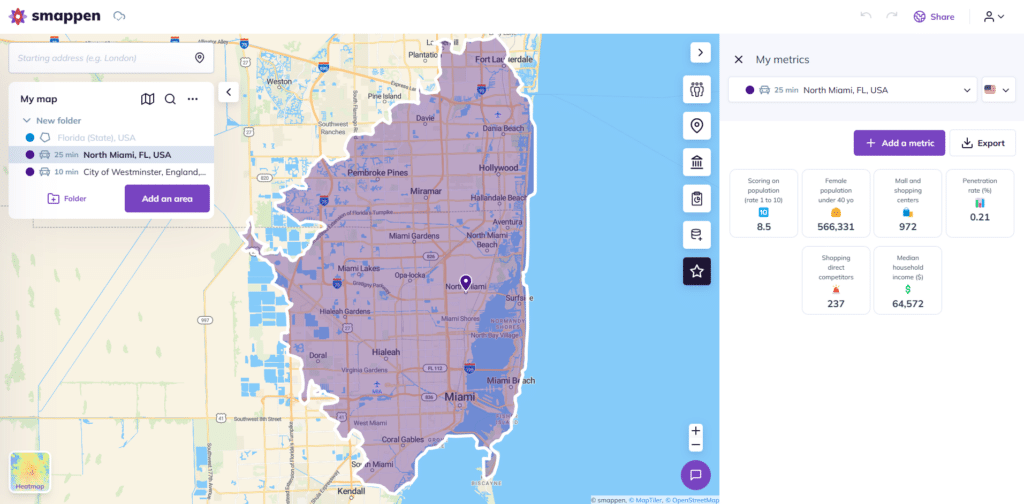
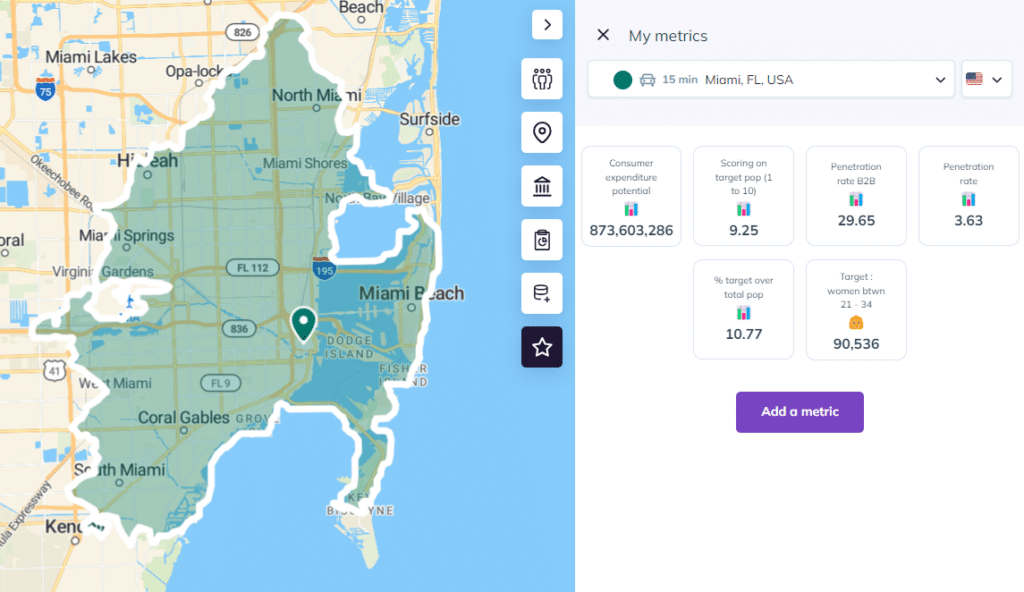
3. Analyze market potential with POIs & demographics
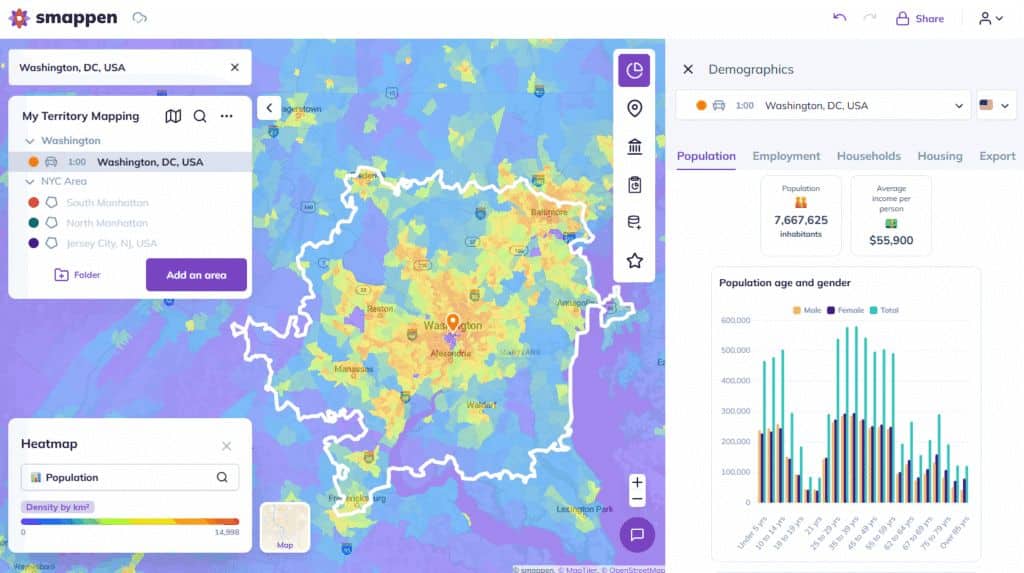
This is where Smappen goes far beyond GeoMapper’s capabilities.
Smappen includes:
- 20M+ Points of Interest (POIs): businesses, services, competitors
- Demographic datasets (population, households, age groups, income, etc.)
- Location-based reports summarising everything inside a territory
You can answer questions like:
- Where are my best-fit customers?
- Where should I expand next?
- Which sales areas are underperforming because of low potential?
4. Plan sales visits and optimise routes
GeoMapper offered route creation and optimised itineraries from point A to B that allowed sales reps to:
- Generate simple route suggestions
- Group nearby prospects
- Reduce back-and-forth travel
- Build a quick sequence of visits directly from HubSpot
With Smappen:
Smappen does not generate turn-by-turn optimized routes.
Instead, it helps field teams:
- You can group prospects by area
- You can create structured, logical visit routes. And build geographic zones for each rep
- You can minimize unnecessary travel by organizing visits geographically
- You get a clean, map-based workflow for planning your day. So you can reduce unnecessary travel thanks to clearer area definition.
In short:
GeoMapper offered simple routing. Smappen focuses on territory clarity and field planning
With Smappen, geographic grouping and visit-planning workflow still deliver major time savings — especially when combined with HubSpot property filters, categories, and smart territory design.
Smappen offers a structured way to define your sales maps:
| Feature | Benefits |
|---|---|
| Geographic segmentation | Equitable workload, no rep burnout |
| Customer/product/industry zones | Tailored assignments based on verticals |
| Overlap avoidance | Protects rep ownership and morale |
The result? A systemized, fair sales environment that drives higher win rates.
5. Share territories & maps with your team
Smappen supports:
- Shared maps
- Permission levels
- Territory reviews
- Collaborative planning sessions
Helpful when working with:
- Franchisees
- Sales reps
- Area managers
- Consultants
How to Migrate from GeoMapper to Smappen (3-Step Guide)
If you’re transitioning away from GeoMapper, moving to Smappen is straightforward.
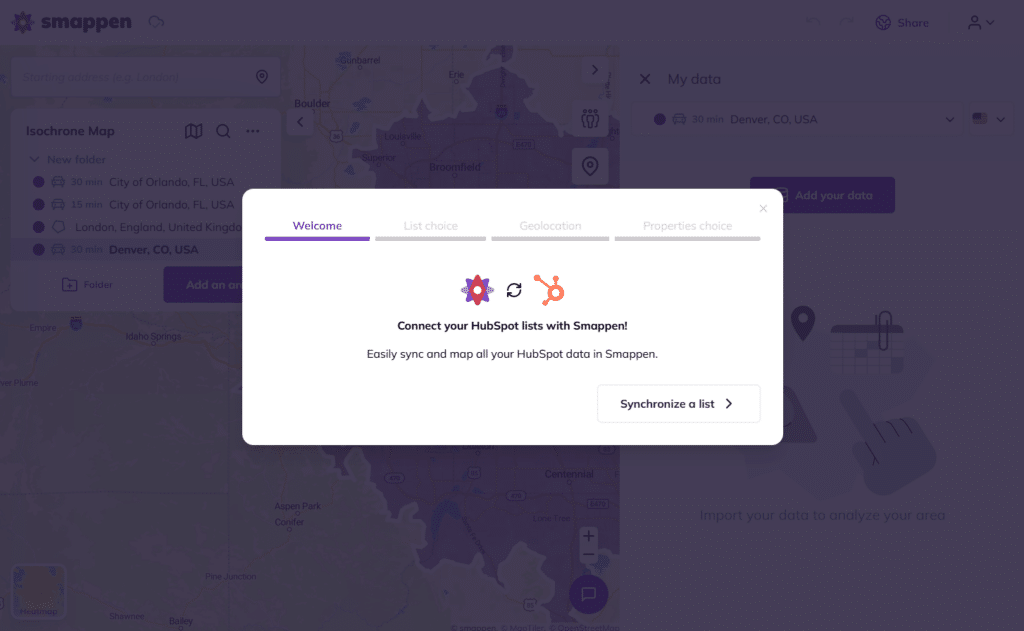
Step 1: Connect Smappen to HubSpot
In Smappen, go to:
Integrations → HubSpot → Connect
Choose what to sync:
- Contacts
- Companies
- Deals
- Lists
- Custom objects (if relevant)
You can sync daily or manually at any time.
Our guide
Step 2: Recreate your GeoMapper views
You can rebuild your old maps in minutes using:
- Filters (industry, owner, lifecycle stage, pipeline…)
- Categories
- Pins & colours
- Saved views
Step 3: Build territories or areas as templates
Then use:
- Drive-time areas
- ZIP codes
- Custom polygons
- POIs & demographics
- Area templates
This gives you a much more precise territory model than before.
👉 Learn more: Smappen × HubSpot Integration
When Should HubSpot Teams Move On From GeoMapper?
You should switch if:
- You can’t create a new GeoMapper account
- You want more than simple point mapping
- You need territory design or expansion planning
- You’re scaling (franchising, retail, field sales)
- You need demographic or POI-based decision making
- You want long-term reliability and support
Smappen covers the entire lifecycle: from mapping → territory design → market analysis → field execution.
Use Cases: Who Benefits Most from Smappen + HubSpot?
Franchise development teams
Define territories, analyse potential markets, and manage territory integrity.
B2B field sales teams
Visit Planning : Plan efficient sales trips and field service routes directly from your mapped CRM records, thanks to a geographical view of your customer and lead base.
Retail & multi-location businesses
Analyse catchment areas, competition, and expansion opportunities.
RevOps & Sales Ops
Create geographic segmentation and refine pipeline coverage.
FAQ's - GeoMapper Alternative
GeoMapper is no longer available for new sign-ups since being acquired by HubSpot. Existing users can keep using it, but the product is not actively accessible for new installations.
HubSpot announced plans to integrate mapping and organisational features natively into the CRM.
Yes. Smappen covers the same core use cases — mapping contacts and drawing areas — and adds advanced functionality such as drive-time territories, POIs, demographics, and routing.
Yes. Smappen offers a native integration that syncs:
- Contacts
- Companies
- Deals
- Lists
You can visualise CRM data instantly on the map and export back into HubSpot.
Yes — many franchise networks use Smappen to design territories, analyse markets, and support franchisee onboarding.
Ready to Replace GeoMapper?
If you’re looking for a modern, powerful, HubSpot-friendly mapping tool, Smappen is the ideal upgrade.